
Local AI Art, Prompt & Workflow Studio for Creators
Tired of chaotic folders and lagging galleries? Browse 100,000+ AI artworks silky-smooth, inspect prompts and generation parameters instantly, and drag workflows back into ComfyUI with zero friction — 100% offline, private, and free.
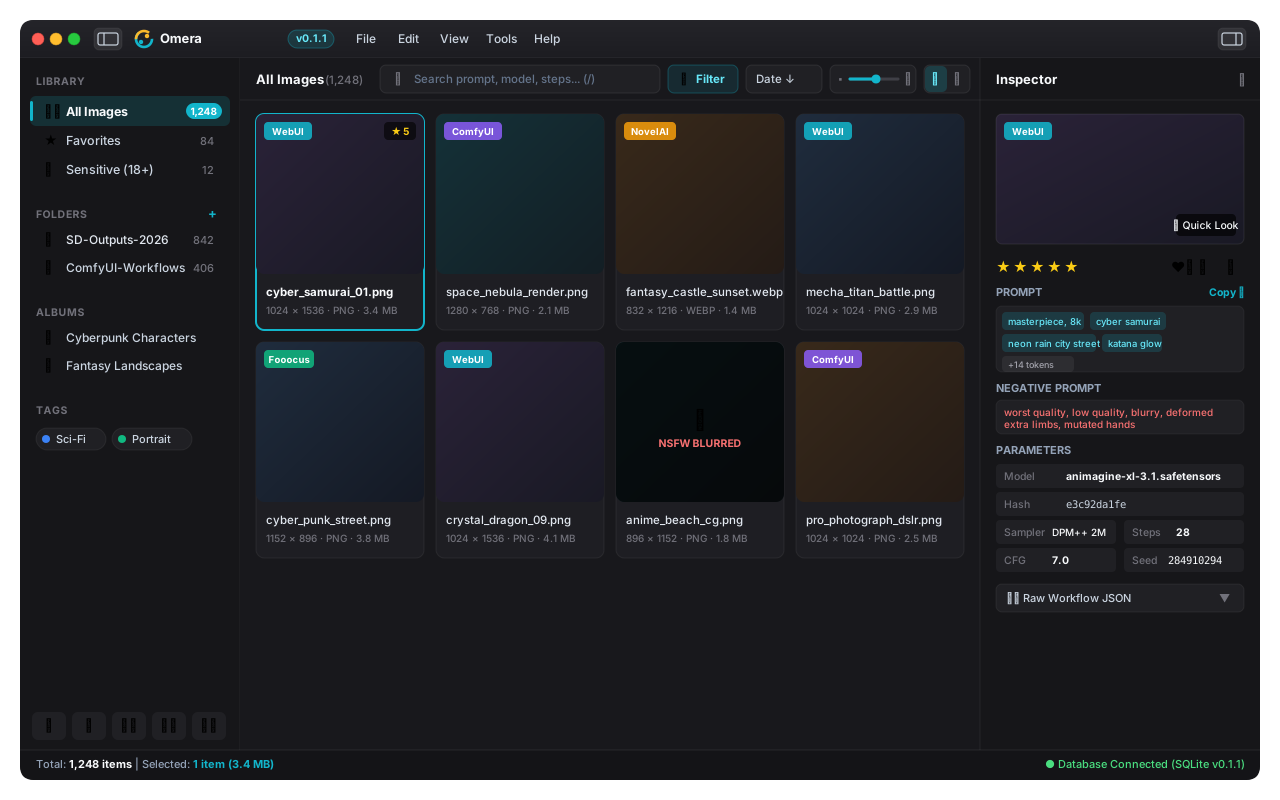
Crafted for High-Frequency AI Creators & Artists
Everything you need to organize, inspect, and revive your AI creations without slowing down your computer or compromising your privacy.
All-in-One 3-Pane Studio
Collapsible smart navigation tree, ultra-smooth virtual gallery with live zoom slider (130px~360px), and an instant generation parameter inspector.
Instant Prompt & Parameter Recovery
Click any artwork to inspect positive and negative prompts, model hashes, samplers, CFG, steps, and seeds. Copy any token in one click.
Burst Stacking & Poker Deck Cards
Auto-collapse continuous bursts and variations into 3D poker deck stacks with authoritative hero cards, range selection, and single-click flattening.
Synchronized Multi-Image Comparison
Compare subtle prompt variations and seed differences side-by-side or overlaid with synchronized pan/zoom and pixel-level parameter diffs.
LoRA Catalog & Trigger Word Assistant
Automatically scan local LoRA weights, preview training tags and trigger words, and insert optimal weights into your prompts with zero friction.
Local CLIP Semantic Search & AI Tagging
Search across 100,000+ artworks by semantic concepts, mood, and visual aesthetics using local on-device neural embeddings — 100% offline.
Masonry Waterfall & Square Grid
Enjoy dynamic waterfall masonry layout alongside classic square grids, showcasing portrait and landscape AI art in their true natural proportions.
Seamless Workflow Drag & Drop
Drag any image directly into ComfyUI to reload full node graphs, or into WebUI PNG Info to recreate the exact generation settings instantly.
100% Offline, Private & Yours
Everything runs on your computer with an embedded database. Zero cloud uploads, zero telemetry, zero subscription fees — your creative assets stay strictly yours.
S3 & WebDAV Snapshot Cloud Backup
Hot VACUUM INTO snapshots with schema verification to AWS S3, R2, MinIO, and Synology/Nextcloud WebDAV, plus bidirectional delta asset sync.
Standalone Single-File HTML Showcase
Export zero-dependency standalone HTML portfolios with responsive dark gallery, fullscreen lightbox, prompt inspector, and keyword search.
Multi-DB Team Studio & O(1) Pagination
Storage engine support for SQLite, MySQL 8.0+, and PostgreSQL 14+ with real-time sync, and keyset cursor deep pagination for 500,000+ assets.
Universal Support for Leading AIGC Ecosystems
Download Omera
Select your platform below. All releases are digitally packaged and open-source on GitHub Releases.
Windows
Compatible with Windows 10 / 11 (64-bit).
macOS
Compatible with macOS 11.0 Big Sur or later.
Linux
Supports Ubuntu, Debian, Arch, Fedora and others.
⚡ Engineered for Speed, Stability & Privacy
Lightweight native desktop architecture engineered for sub-second responsiveness, zero memory bloat, and total offline privacy.
⌨️ Efficiency Keyboard Shortcuts
Master your AIGC workflow with rapid single-key shortcuts without lifting your hands from the keyboard.
Frequently Asked Questions
Everything you need to know about Omera.
Does Omera upload any of my images, prompts, or personal data to the cloud? ▼
No, absolutely not. Omera is 100% local-first and works completely offline. All image scanning, prompt inspection, thumbnail caching, and indexing stay strictly on your local machine with zero telemetry or cloud sync.
Can I drag images directly from Omera into ComfyUI or WebUI? ▼
Yes! Native OS drag-and-drop is fully supported. Simply drag any artwork card from Omera directly onto your ComfyUI canvas to instantly reconstruct the full workflow node graph, or into WebUI PNG Info to reload all generation parameters.
Will my computer lag if I have over 50,000+ high-resolution AI images in a folder? ▼
Not at all. Omera uses an ultra-fast virtual gallery that only renders what is currently visible on screen, coupled with intelligent background thumbnail processing. Your interface stays buttery smooth with low RAM and CPU usage, even with 100,000+ images.
Is Omera completely free and open source? ▼
Yes! Omera is 100% free and open source under the GNU Affero General Public License v3.0 (AGPL-3.0). There are no paywalls, subscriptions, or hidden limits.